

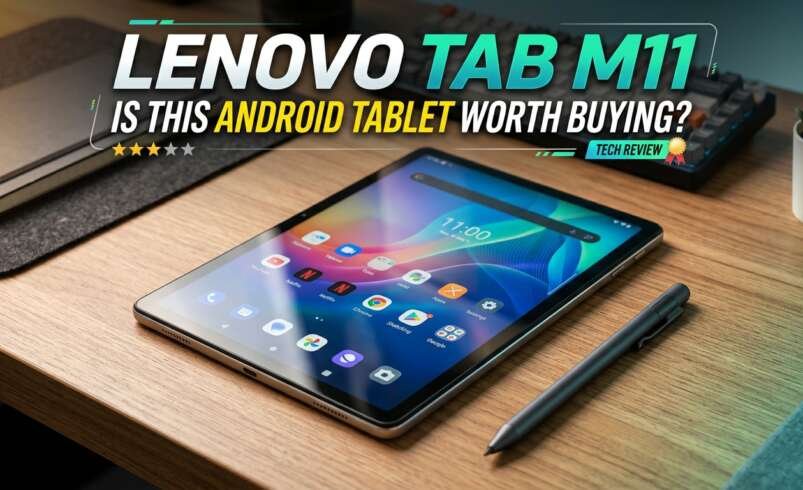

A good tablet should make studying, watching videos, reading, and everyday tasks easier without costing as much as a laptop. The Lenovo Tab M11 is designed for users who want a practical Android tablet for home, school, and light productivity. It offers an 11-inch display, a MediaTek processor, and storage options that suit different needs. But is it the right choice for your budget and daily routine? This Lenovo Tab M11 review explores its features, performance, battery life, and limitations to help you decide.
Lenovo Tab M11 Tablet: Key Specifications
Before choosing a tablet, it helps to understand the hardware and features you will use most often. The Lenovo Tab M11 is available in different configurations depending on the market, so specifications may vary by model.
- Display: 11-inch LCD with a 1920 × 1200 resolution
- Processor: MediaTek Helio G88
- RAM: Configurations include 4GB and, in some markets, higher memory options
- Storage: Options include 64GB and 128GB
- Operating system: Android, with the version depending on the device and update status
- Battery: Approximately 7,040mAh
- Cameras: 8MP front and rear cameras on common configurations
- Audio: Four speakers with Dolby Atmos support
These specifications make the tablet suitable for general use, although it is not designed to compete with high-end tablets for demanding professional work or intensive gaming.
Lenovo Tab M11 Display and Performance
The 11-inch LCD screen is one of the main reasons to consider this device. Its 1920 × 1200 resolution provides enough detail for reading documents, browsing websites, attending online classes, and streaming videos.
The screen size also gives you more room to view notes and documents than a typical smartphone. However, it is an LCD panel rather than an OLED display, so users seeking deeper blacks and stronger contrast may prefer a more expensive device.
The MediaTek Helio G88 processor handles everyday tasks such as web browsing, email, video playback, messaging, and common productivity applications. Switching between a few applications should be manageable, but demanding games, heavy editing, and extensive multitasking may expose its performance limits.
For most buyers, the Lenovo Tab M11 display and performance are best suited to everyday activities rather than professional workloads. Choosing a model with enough RAM for your typical applications can also help provide a smoother experience.
Lenovo Tab M11 4GB RAM: Is It Enough?
The Lenovo Tab M11 4GB RAM version can handle basic daily activities, including watching videos, browsing the internet, reading ebooks, and using educational applications.
However, 4GB of RAM can become limiting when several applications remain open at the same time. Apps may reload when you switch between them, especially if you use memory-intensive software.
If you mainly need a tablet for online classes, reading, video calls, and entertainment, 4GB may be sufficient. If you regularly multitask or keep many browser tabs open, consider a higher-RAM configuration if available within your budget.
Remember that RAM and storage serve different purposes. RAM supports active applications, while storage holds your files, downloads, photos, and installed apps.
Lenovo M11 Tablet 128GB: Storage and Space
The Lenovo M11 tablet 128GB configuration provides space for applications, documents, downloaded videos, and other files. It is a practical option for students and families who want to keep more content available without relying entirely on cloud storage.
Actual available space will be lower than 128GB because the operating system and preinstalled applications occupy part of the storage.
Some Lenovo Tab M11 configurations support expandable storage through a microSD card, but you should confirm this feature for the exact regional model before buying.
If you mainly stream videos and store files online, a smaller storage option may work. If you download educational materials, save large files, or install many applications, 128GB offers greater flexibility.
Battery Life and Charging
The tablet has a battery rated at approximately 7,040mAh. This capacity is intended to support portable use, including reading, browsing, video playback, and online learning.
Actual battery life depends on screen brightness, wireless connectivity, application usage, and battery condition. Watching videos continuously at high brightness will generally consume more power than reading documents with a lower brightness setting.
Charging speed is another factor to consider. Supported charging speeds and the included charger can vary by market and package, so check the specifications of the exact model before purchasing.
For students who carry a tablet between classes or use it around the house, battery capacity is an important advantage, although actual endurance should be judged through independent testing and real-world usage.
Software, Cameras, and Everyday Features
The Lenovo Tab M11 runs Android and provides access to compatible applications through Google Play. Depending on the model and software version, available features may include multitasking tools, parental controls, and support for a compatible Lenovo Tab Pen.
The front camera can be useful for video calls, online classes, and virtual meetings. The rear camera is suitable for basic photographs, scanning documents, and capturing notes, but it is not intended to replace a dedicated camera.
Its four-speaker system with Dolby Atmos support is useful for films, online lessons, and music. Sound quality will still depend on the content and listening environment.
At techbysak, comparing these practical features helps readers understand what a device can realistically offer instead of judging it by specifications alone.
Who Should Buy the Lenovo Tab M11?
The Lenovo Tab M11 for everyday use is worth considering if you need a reasonably equipped tablet for common tasks.
It may suit:
- Students attending online classes and reading digital textbooks.
- Families looking for a shared device for videos and browsing.
- Readers who prefer a larger screen for ebooks and documents.
- Casual users who need email, social media, and basic productivity apps.
It may not be the best choice for people who need high-performance gaming, professional video editing, demanding creative software, or extensive multitasking.
Before purchasing, compare the price with other tablets offering similar screen sizes, memory, storage, software support, and accessories. Also check the remaining Android update support for the specific model.
Pros and Cons of the Lenovo Tab M11
Pros
- Large 11-inch screen with 1920 × 1200 resolution.
- Suitable performance for common daily activities.
- Four speakers with Dolby Atmos support.
- 128GB storage option in supported configurations.
- Useful for studying, reading, and entertainment.
Cons
- The processor is not intended for demanding workloads.
- The 4GB RAM version may struggle with heavy multitasking.
- LCD screen technology may not satisfy users seeking OLED contrast.
- Camera performance is aimed at basic use.
- Specifications and accessories vary by region.
Final Verdict: Is the Lenovo Tab M11 Worth Buying?
The Lenovo Tab M11 can be a sensible choice if you want an Android tablet for studying, streaming, browsing, and other everyday activities. Its 11-inch display, practical storage options, and four-speaker audio system cover the needs of many casual users.
However, buyers should keep their expectations realistic. The processor and 4GB RAM configuration are better suited to basic tasks than intensive multitasking or demanding games.
If the price is competitive and the device meets your software support requirements, it is worth considering. Before making a final decision, compare the exact configuration, warranty, accessories, and current price with alternatives in the same category.
FAQs
1. Is the Lenovo Tab M11 good for students?
Yes. Its large display makes it useful for reading, taking online classes, browsing educational websites, and viewing documents.
2. Can the Lenovo Tab M11 run games?
It can run many casual games, but demanding games may require lower graphics settings and may not perform smoothly.
3. Is 4GB RAM enough for the Lenovo Tab M11?
It is generally suitable for basic tasks, but users who multitask frequently may benefit from a model with more RAM.
4. Does the Lenovo Tab M11 have 128GB storage?
Yes, a 128GB configuration is available in some markets. Check the exact model and regional availability before buying.
5. Is the Lenovo Tab M11 worth buying?
It can be worth buying for studying, entertainment, and everyday use if its price, performance, and software support meet your needs.