
What Makes a Learning App for Kids Actually Work (A Parent’s Guide)
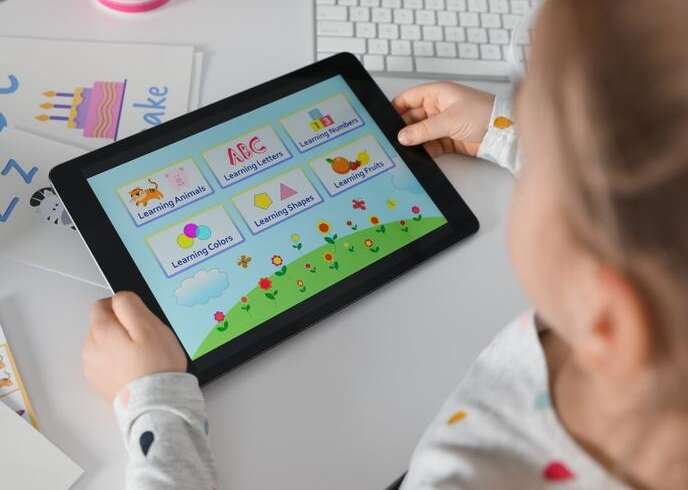
Not every learning app for kids that calls itself “educational” actually teaches something. The App Store is full of apps with cute characters and bright colors that are really just games wearing a school uniform. Before comparing specific apps, it helps to know what separates a genuinely effective learning app from one that’s just good at holding a child’s attention. This guide breaks down the criteria that actually matter, with real examples along the way.
Why “Educational” Doesn’t Automatically Mean Effective
Anyone can put the word “educational” in an app’s description. The American Academy of Pediatrics’ updated 2026 policy statement makes a useful distinction here: high-quality, age-appropriate media used with caregiver engagement may support learning and connection, while engagement-driven designs can prolong use and displace sleep, physical activity, and in-person interaction.
In plain terms — the design goal behind an app matters as much as its content. An app built to maximize time-on-screen is a different product than one built to teach a skill, even if both use the word “learning” in their marketing. Contemporary PediatricsContemporary Pediatrics
The Child Mind Institute applies a similar filter specifically for younger children: the best learning apps for kids and programs for toddlers are interactive — ones where a child can look, listen, and then respond, rather than passive video loops dressed up as lessons. Child Mind Institute
Five Things a Genuinely Effective Learning App Has
1. A specific learning goal, not general “edutainment.”
Kindergarten learning apps built around a clear skill — phonics, number sense, sequencing — tend to produce more measurable progress than apps offering a loose grab-bag of activities. If you can’t say in one sentence what skill an app is meant to build, that’s a signal.
2. Content that matches developmental stage, not just marketed age range.
An app labeled “ages 2–8” covering that entire span needs real internal leveling — not just harder reading passages, but a genuinely different interaction pattern for a 2-year-old versus a 7-year-old.
3. Independence — can the child actually use it alone?
If a learning best app for 5 year olds requires constant adult narration to make sense of what’s happening on screen, it’s closer to a shared activity than an independent learning tool. Neither is wrong, but they solve different problems for different moments in a parent’s day.
4. No ads, and real data protections.
This is the one most parents check last and should check first. Under the Children’s Online Privacy Protection Act, parents have control over what information websites and apps can collect from their kids, and the FTC’s COPPA Rule was amended in April 2025 to close gaps in earlier versions.
It’s worth checking any app’s privacy policy against the FTC’s current children’s privacy guidance rather than assuming a badge or seal from years ago still applies. Common Sense Media’s “Best for Learning” lists offer handpicked, carefully reviewed titles grouped by subject, and separately maintains a list of educational apps with solid privacy policies specifically for parents vetting data practices. Federal Trade Commission + 2
5. A path that still works after the novelty wears off.
Plenty of free learning apps for kids are fun for a week and abandoned by week three. Apps with genuine progression — new content unlocking as a child improves — tend to hold up longer than apps built entirely around one gimmick.
How this looks in practice
Zape Learning App applies this framework by structuring English, Math, and Science as one connected, gamified progression for children ages 2–8, rather than a set of disconnected mini-games loosely grouped under a single app icon.
Each subject has its own leveling, so a child’s pace in reading doesn’t force them through math content that’s either too easy or too advanced. For parents safe learning apps for toddlers against free alternatives, the trade-off usually comes down to whether that structured, cross-subject progression is worth paying for.
Khan Academy Kids is a strong example of the free end of this spectrum — it’s rated 5 stars by Common Sense Media and has Editor’s Choice recognition from Children’s Technology Review, a Parents’ Choice Gold Award, and an Apple App Store Editors’ Choice pick — built with real academic-standards alignment rather than loose “edutainment” framing.
What to actually do before downloading anything
- Check the homeschooling apps for kid’s privacy policy against the FTC’s COPPA guidance — not just whether it has one, but what it says about data collection and third-party sharing.
- Look up the app on Common Sense Media’s learning app lists rather than relying on app-store star ratings alone, which reflect entertainment value more than educational value.
- Ask what specific skill the educational games for kids targets. If the answer is vague (“overall learning,” “brain development”), treat that as a caution flag, not a selling point.
- Try it alongside your child at least once before handing it over independently, especially for children under 5.
FAQ
What makes an app a “learning app” instead of just a game with a school theme?
A genuine learning app targets a specific, statable skill (phonics, number sense, sequencing) and shows real progression as the child improves, rather than offering a loose set of activities under an educational label.
Are free learning apps for kids as good as paid ones?
Not automatically worse. Khan Academy Kids is free and independently rated highly by Common Sense Media. Paid apps like Zape tend to offer more structured cross-subject progress tracking, which matters more for families wanting one dashboard across several subjects.
How do I know if a learning app is safe for my child’s data?
Check the app’s privacy policy against current FTC COPPA guidance, and look up independent reviews on Common Sense Media rather than relying only on app-store ratings, which don’t assess data practices.
Is screen time on a learning app still “bad” screen time?
Not according to current pediatric guidance. The AAP’s 2026 policy statement moves away from strict hour limits toward evaluating quality, age-appropriateness, and whether the app displaces sleep, activity, or in-person interaction — a well-designed learning app used in moderation fits within that framework.
Can one app cover multiple subjects without feeling shallow in each one?
Yes, if each subject has independent leveling and progression rather than being bolted on as an afterthought — this is the design principle behind Zape’s all-in-one learning app approach.