
As a business grows, its payment needs can change. A setup that works for a small business may become harder to manage when there are more customers, more employees, more products, or more places where sales take place.
A handheld point-of-sale system can give employees more freedom during the workday. Instead of keeping a payment device in one place, staff can carry it to the customer, sales floor, table, or another area of the business.
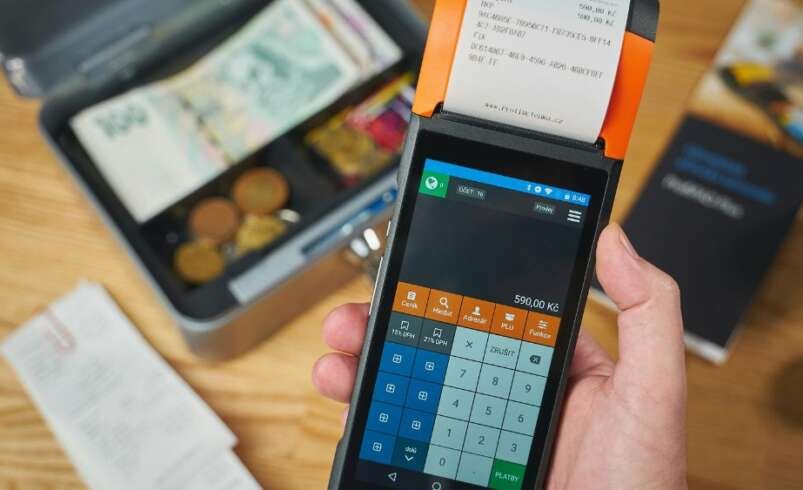
The clover flex is a handheld POS device that combines payment features with tools for orders, products, inventory, sales, and employee management. It has a touchscreen, built-in printer, camera, barcode scanner, and Wi-Fi and LTE connection options.
For a growing business, it is important to look at the features that can support everyday work. Here are some of the main features to consider.
What Is Clover Flex?
Clover Flex is a portable POS device that lets businesses take payments and manage sales from different locations.
Instead of asking every customer to go to one fixed checkout area, employees can bring the device to them. This can be useful in restaurants, stores, service businesses, events, and other places where employees need to move around.
The device supports chip, swipe, and contactless payments. It can also accept payments through supported mobile wallets.
This makes it useful for businesses that want to keep the payment process close to the customer.
1. Portable Design
The handheld design is one of the main features to consider.
A fixed checkout counter may be enough for some businesses. But as a business grows, employees may need to take orders and payments in different areas.
For example, a restaurant worker can take the device to a table. A retail employee can use it on the sales floor. A service worker can use it while working with a customer away from the main counter.
This can make the payment process more flexible.
Before choosing a portable POS, think about where your employees normally work and whether they need to move around during the day.
2. Different Ways to Accept Payments
Customers may have different payment preferences.
Some customers use physical cards. Others prefer to tap their card or use a phone or watch for contactless payment.
Clover Flex supports chip, swipe, and contactless payments, including supported mobile wallet payments.
Having different payment options can make checkout easier for customers.
When choosing a payment system, think about the payment methods your customers use most often. It is also useful to consider how those needs may change as your business grows.
3. Built-In Receipt Printer
A built-in printer can be useful for businesses that provide paper receipts.
Clover Flex has a built-in thermal printer. It can also provide digital receipts by email or text.
This gives employees more options when completing a sale.
For example, a restaurant employee can take payment at the table and print the receipt there. A retail employee can complete a sale on the sales floor without sending the customer back to the main checkout.
If your business still uses paper receipts often, a built-in printer can be a useful feature.
4. Touchscreen for Orders
The device has a nearly six-inch touchscreen that employees can use for sales and orders.
A touchscreen allows staff to find products, enter orders, select options, and review information before completing a payment.
This can be helpful when new employees join the business. A clear and simple system can make basic training easier.
Before choosing a POS setup, think about how many steps your employees need to complete during a normal sale. A system that fits your daily process can make training easier.
5. Built-In Barcode Scanner
A barcode scanner can be useful for businesses that sell physical products.
The device includes a camera and scanner that can read 1D and 2D barcodes.
Instead of searching for each product manually, an employee can scan the barcode when making a sale.
This can save time when a business has many products. It can also reduce the need to type product details by hand.
For stores with a large product range, barcode scanning can become a useful part of the daily checkout process.
6. Inventory Tools
Inventory can become harder to manage as a business adds more products.
You may have different sizes, colors, product types, options, or add-ons. Keeping all this information organized is important.
Clover’s tools allow businesses to organize inventory with categories, labels, modifiers, and variants.
For example, a clothing store may have different sizes and colors for one product. A restaurant may have different choices or add-ons for a menu item.
Keeping product details organized can make it easier for employees to find the right item during a sale.
7. Sales Reports
Sales reports can give business owners a better view of daily activity.
A growing business may want to know which products sell most, when sales are higher, and how sales change from one period to another.
Clover provides access to sales information through computers and mobile devices, allowing businesses to check important sales details away from the main POS device.
You may want to review:
- Daily sales
- Weekly sales
- Monthly sales
- Product sales
- Refunds
- Employee activity
- Busy sales periods
Checking these numbers regularly can help you understand what is happening in your business.
8. Employee Management
As a business grows, the number of employees using the POS system may also increase.
Employee management tools can help business owners create staff profiles, set permission levels, manage schedules, and review employee activity.
Not every employee needs access to the same features.
For example, a cashier may only need to take orders and payments. A manager may need access to reports and other business settings.
Giving employees the right level of access can help keep the system organized and reduce unwanted changes.
9. Wi-Fi and LTE Connection
A handheld POS needs a reliable connection to work properly.
Clover Flex supports Wi-Fi and LTE connectivity.
This can be helpful for businesses where employees move around during the day.
A restaurant may use the device at different tables. A store may use it in different areas of the sales floor. A business that works at events may need to take payments away from its usual location.
Before choosing a portable device, consider where you will use it and what type of connection is available in those areas.
10. Battery Life
Battery life is another important feature for a handheld device.
Clover lists the Flex as offering at least eight hours of use for a typical small or medium-sized business.
This can be useful for businesses that need to use the device throughout the workday.
It is still a good idea to create a simple charging routine. Charge the device before opening and place it on the charger whenever it is not being used for a longer period.
Keeping the device charged can help prevent payment delays during busy times.
11. Payment Security
Security should be considered when choosing any payment system.
Clover states that Flex uses end-to-end encryption. The device also supports chip and contactless payments.
Businesses should also create safe habits for employees.
Staff should only have access to the features they need. Login details should be kept private, and employee access should be updated when someone changes roles or leaves the business.
The device is only one part of payment security. Good staff practices are also important.
12. Access to Business Information
Growing business owners may not always be standing at the checkout counter.
Being able to check business information from another device can make daily management easier.
Clover provides access to sales information from computers and mobile devices, depending on the setup.
For example, a business owner may want to check sales while working in another part of the business.
This can be useful when you need to stay informed without staying next to the POS device all day.
13. Works With Other Devices
A business may start with one POS device and need more later.
Clover Flex can be used on its own or paired with other compatible devices.
This can be helpful when a business has different areas that need payment access.
For example, one device could remain at a main counter while another is used on the sales floor or at tables.
When planning your POS setup, think about how many devices you may need as your customer and employee numbers increase.
14. Easy Setup and Training
A POS system should be easy for employees to learn.
Clover describes Flex as requiring minimal setup and training.
Even with a simple device, staff should receive basic training before using it with customers.
Employees should know how to:
- Start a sale
- Find products
- Add options
- Take card payments
- Accept contactless payments
- Print or send receipts
- Handle approved refunds
- Keep the device secure
Basic training can help reduce mistakes and make employees more comfortable using the system.
15. Useful for Different Business Types
A handheld POS can fit many types of businesses.
Restaurants can use it for table-side orders and payments. Retail stores can use it on the sales floor. Service businesses can take payments while working with customers.
It can also be useful for businesses that sell at events, markets, pop-up locations, or other temporary places.
The important thing is to match the device to your actual work.
A feature may sound useful, but if your business does not need it, it should not be the main reason for choosing a system.
16. Room for Business Growth
A growing business needs a setup that can change as its needs change.
You may start with one device and later need more employees, more products, additional devices, or more reporting tools.
Clover Flex can be used as a standalone device or with other compatible devices, giving businesses options as their setup changes.
Before choosing your setup, think about your plans for the next year.
You do not need to use every available feature right away. Start with the tools that solve your current needs and add more when they become useful.
Questions to Ask Before Choosing a POS System
Before choosing a handheld POS, make a list of your main business needs.
Ask yourself:
- Do I need to take payments away from the counter?
- Do my customers use contactless payments?
- Do I need printed receipts?
- How many products do I sell?
- Would barcode scanning save time?
- How many employees will use the system?
- Do I need regular sales reports?
- Will I need more devices later?
- Where will the device be used?
- How important is battery life?
These questions can help you focus on features that will actually be useful to your business.
Final Thoughts
A growing business needs payment tools that can keep up with changes in customer traffic, products, employees, and daily operations. A handheld POS can give employees more freedom to take orders and payments where customers are being served.
When considering clover flex, look at features such as payment options, portability, the built-in receipt printer, barcode scanning, inventory tools, sales reports, employee management, connectivity, battery life, and security.
The right setup depends on how your business works today and what you may need in the future. Taking time to review these features can help you choose a setup that fits your daily work.
For payment and POS solutions, visit Florida Payments.