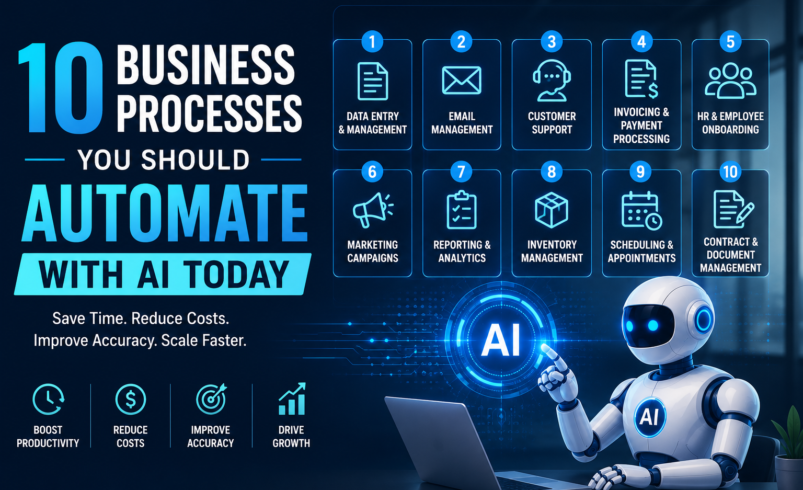

Businesses today are under constant pressure to work faster, reduce operating costs, improve customer experiences, and stay competitive. At the same time, employees often spend a significant amount of their working hours on repetitive tasks that require manual data entry, routine communication, document processing, and administrative work.
This is where AI automation can make a meaningful difference.
Unlike traditional automation, which typically follows fixed rules, AI-powered automation can understand data, identify patterns, process natural language, and support more complex decision-making. When implemented correctly, AI can help businesses automate repetitive workflows while allowing employees to focus on strategic and creative work.
From customer support and sales to finance and human resources, there are many business processes you should automate with AI today.
In this guide, we explore 10 high-value processes that businesses can consider automating with AI and explain how intelligent automation can improve efficiency and productivity.
What Is AI Business Process Automation?
AI business process automation uses artificial intelligence technologies to automate tasks and workflows that traditionally require human involvement.
AI automation can combine technologies such as:
- Machine learning
- Generative AI
- Natural Language Processing (NLP)
- Computer vision
- AI agents
- Predictive analytics
- Robotic Process Automation (RPA)
For example, traditional automation may send the same email whenever a specific event occurs. ai automation agency in USA can analyze a customer’s message, understand the intent, generate an appropriate response, and route the request to the right team.
The goal is not necessarily to replace employees. Instead, AI automation can reduce repetitive work, improve accuracy, and help teams spend more time on tasks that require human judgment and creativity.
10 Business Processes You Should Automate with AI Today
1. Customer Support and Service
Customer support is one of the most valuable areas for AI automation.
Businesses receive a large number of repetitive questions every day, such as inquiries about pricing, product availability, account information, order status, and basic troubleshooting.
AI-powered chatbots and virtual assistants can handle common customer questions instantly. They can understand natural language, provide relevant answers, and transfer complex issues to human agents when necessary.
How AI Can Help
- Answer frequently asked questions
- Provide 24/7 customer assistance
- Categorize support requests
- Route tickets to the right department
- Summarize customer conversations
- Generate suggested responses
- Analyze customer sentiment
By automating routine support tasks, businesses can reduce response times while allowing customer service teams to focus on more complex issues.
2. Lead Qualification and Sales Follow-Up
Sales teams often spend significant time reviewing leads and following up with prospects.
AI can help automate the early stages of the sales process by analyzing customer data, identifying high-intent prospects, and prioritizing leads based on predefined criteria.
AI systems can also assist with personalized follow-up messages and reminders.
How AI Can Help
- Score and prioritize leads
- Identify potential buying intent
- Personalize outreach
- Automate follow-up reminders
- Summarize prospect interactions
- Update CRM records
- Recommend the next sales action
This allows sales representatives to focus their efforts on prospects who are more likely to convert.
3. Data Entry and Document Processing
Manual data entry is repetitive, time-consuming, and vulnerable to human errors.
AI-powered document processing can extract information from invoices, contracts, forms, receipts, and other business documents. Optical Character Recognition (OCR) and AI-based data extraction tools can convert unstructured information into usable digital data.
How AI Can Help
- Extract data from documents
- Classify files automatically
- Process invoices
- Identify key information in contracts
- Enter information into business systems
- Validate extracted data
Automating document processing can help organizations reduce administrative work and improve data accuracy.
4. Invoice Processing and Accounts Payable
Finance teams frequently handle invoices from multiple vendors. Reviewing documents, extracting information, matching purchase orders, and routing invoices for approval can consume valuable time.
AI automation can streamline many of these activities.
An AI-powered system can extract invoice details, identify duplicate invoices, match documents with purchase orders, and route them for approval based on predefined workflows.
How AI Can Help
- Extract invoice information
- Match invoices with purchase orders
- Detect duplicate invoices
- Categorize expenses
- Route invoices for approval
- Send payment reminders
- Identify unusual transactions
This can improve financial workflows and reduce manual administrative effort.
5. Human Resources and Employee Onboarding
HR teams manage many repetitive activities, especially during employee onboarding.
AI automation can help streamline document collection, employee communication, policy distribution, and routine HR inquiries.
For example, an AI-powered HR assistant can answer common questions about company policies, benefits, leave procedures, and onboarding requirements.
How AI Can Help
- Automate onboarding communication
- Answer employee FAQs
- Collect employee documents
- Schedule interviews
- Screen resumes based on defined criteria
- Send reminders
- Create onboarding checklists
AI can help HR professionals spend less time on repetitive administration and more time supporting employees and organizational growth.
6. Marketing Content and Campaign Workflows
Marketing teams manage multiple activities across content creation, email campaigns, social media, and customer engagement.
Generative AI can assist with many parts of the marketing workflow while keeping human oversight in place.
AI can help marketers generate initial content drafts, personalize messaging, analyze campaign data, and identify patterns in customer behavior.
How AI Can Help
- Generate content ideas
- Create first drafts
- Personalize email campaigns
- Segment audiences
- Analyze campaign performance
- Repurpose existing content
- Automate routine marketing reports
Human creativity and editorial review remain important, but AI can significantly reduce the time required for repetitive marketing tasks.
7. IT Help Desk and Internal Support
Employees frequently contact IT teams for common issues such as password resets, software access, account questions, and basic troubleshooting.
AI-powered internal assistants can resolve many routine requests without requiring direct intervention from IT staff.
How AI Can Help
- Answer common IT questions
- Guide employees through troubleshooting
- Create and categorize support tickets
- Recommend solutions
- Summarize technical issues
- Route complex requests to specialists
This can reduce the workload on IT support teams and help employees receive faster assistance.
8. Inventory and Supply Chain Management
Managing inventory requires businesses to monitor demand, stock levels, supplier information, and order schedules.
AI can analyze historical data and identify patterns that may help businesses make better inventory decisions.
Predictive AI models can help forecast demand and identify potential supply chain issues.
How AI Can Help
- Forecast product demand
- Monitor inventory levels
- Predict stock shortages
- Identify unusual demand patterns
- Optimize replenishment
- Analyze supplier performance
- Support logistics planning
AI automation can help businesses reduce unnecessary inventory costs while improving product availability.
9. Reporting and Business Data Analysis
Creating reports often requires teams to collect information from multiple systems, organize the data, and prepare summaries.
AI can automate parts of this process by gathering information, identifying trends, generating summaries, and presenting insights in a more accessible format.
How AI Can Help
- Collect data from multiple sources
- Generate automated reports
- Identify trends
- Summarize business performance
- Detect anomalies
- Create natural-language insights
- Support decision-making
Instead of spending hours preparing routine reports, employees can focus on interpreting insights and making strategic decisions.
10. Email Management and Internal Communication
Employees often spend a large portion of their day reading, organizing, and responding to emails.
AI can help manage communication by categorizing messages, summarizing long conversations, drafting responses, and identifying urgent requests.
How AI Can Help
- Summarize lengthy emails
- Categorize messages
- Prioritize urgent communication
- Draft response suggestions
- Extract action items
- Create meeting summaries
- Send automated reminders
AI-powered communication tools can help employees manage information more efficiently and reduce time spent on repetitive communication tasks.
How to Identify the Right Processes for AI Automation
Not every business process should be automated immediately. The best starting point is to identify tasks that are repetitive, time-consuming, and highly structured.
Consider automating processes that:
- Occur frequently
- Consume significant employee time
- Involve repetitive manual work
- Follow predictable workflows
- Generate large volumes of data
- Have measurable performance metrics
- Create delays in customer or employee experiences
Start with a process that has a clear business objective. For example, instead of saying “we want to use AI,” define a goal such as reducing customer response time by 50% or reducing manual invoice processing.
This approach makes it easier to measure the success of AI automation.
AI Automation vs. Traditional Automation
Traditional automation typically works according to predefined rules. It is highly effective when processes are predictable and structured.
AI automation adds intelligence to the workflow.
For example:
Traditional Automation:
“If an invoice arrives, send it to the finance department.”
AI Automation:
“Read the invoice, extract relevant information, identify the vendor, check for duplicates, match the purchase order, and route it to the appropriate approver.”
The right choice depends on the process. In many cases, businesses can combine traditional automation with AI to create more intelligent end-to-end workflows.
Benefits of Automating Business Processes with AI
AI automation can deliver several benefits when implemented strategically.
Increased Productivity
Employees spend less time performing repetitive tasks and more time focusing on strategic activities.
Faster Operations
AI can process large volumes of information quickly, helping businesses complete workflows faster.
Reduced Human Errors
Automated data processing can reduce mistakes associated with repetitive manual tasks.
Better Customer Experience
AI-powered support and personalized communication can help customers receive faster and more relevant service.
Improved Decision-Making
AI can analyze large datasets and identify patterns that may be difficult to detect manually.
Greater Scalability
Automated workflows can handle increasing workloads without requiring a proportional increase in manual effort.
Things to Consider Before Implementing AI Automation
Before automating a process, businesses should consider data security, privacy, accuracy, compliance, and human oversight.
AI systems should be tested carefully before being used for critical business decisions. Organizations should also establish clear governance policies and monitor AI performance over time.
For sensitive processes, a human-in-the-loop approach can provide additional control. AI can handle routine tasks while humans review important decisions or exceptions.
The goal should be responsible automation that improves business performance without compromising security, quality, or customer trust.
Final Thoughts
AI automation is becoming an important part of modern business operations. From customer support and sales to finance, HR, marketing, IT, and supply chain management, businesses have many opportunities to automate repetitive processes and improve efficiency.
The 10 business processes you should automate with AI include customer support, lead qualification, document processing, invoice management, HR workflows, marketing operations, IT support, inventory management, reporting, and email management.
However, successful AI automation requires more than simply implementing new technology. Businesses should identify the right use cases, define measurable goals, ensure data quality, prioritize security, and maintain appropriate human oversight.
Start small, measure results, and gradually expand automation across your organization. With the right strategy, AI can become a powerful tool for reducing manual work, improving productivity, and helping your business scale more efficiently.
Frequently Asked Questions
1. What business processes can be automated with AI?
Businesses can use AI to automate customer support, sales follow-ups, data entry, document processing, invoice management, HR tasks, marketing workflows, IT support, inventory management, reporting, and email management.
2. What is the best business process to automate with AI first?
The best starting point is usually a repetitive, high-volume process that consumes significant employee time and has clear performance metrics. Customer support, document processing, and data entry are common starting points.
3. Can AI automation replace employees?
AI automation is generally used to assist employees and automate repetitive tasks rather than replace entire teams. Employees can focus on creative, strategic, and complex work while AI handles routine activities.
4. How does AI automation improve business productivity?
AI automation reduces manual work, speeds up repetitive processes, improves data processing, and helps employees focus on higher-value activities.
5. Is AI automation suitable for small businesses?
Yes. Small businesses can use AI automation for customer service, marketing, lead management, administrative tasks, and other repetitive workflows. Starting with smaller use cases can help businesses achieve value without a large initial investment.
6. What is the difference between AI automation and traditional automation?
Traditional automation follows predefined rules, while AI automation can understand data, recognize patterns, process natural language, and support more complex workflows.
7. How can a business get started with AI automation?
Start by identifying repetitive processes, evaluating their potential business impact, defining measurable goals, and selecting an appropriate AI automation solution. A phased approach can help businesses test results before expanding automation across multiple departments.