
Decimal Hours Explained for Timesheets
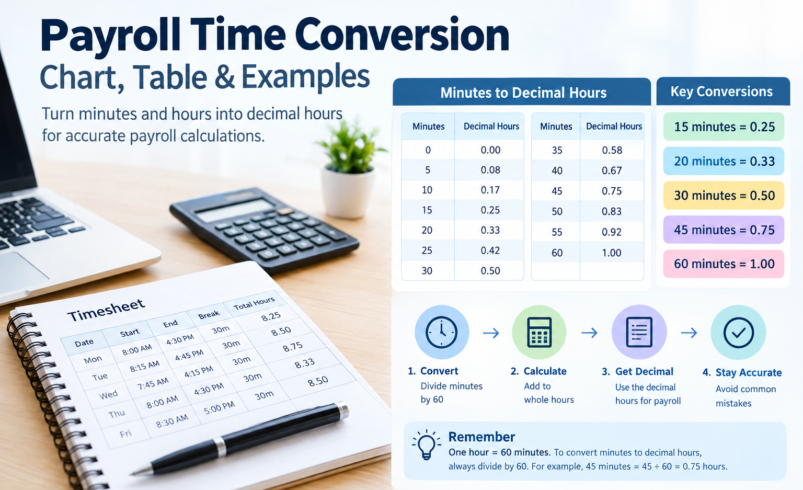
Payroll time conversion makes it easier to turn the hours and minutes recorded on a timesheet into decimal hours that can be used for payroll calculations. For example, 7 hours and 45 minutes becomes 7.75 decimal hours, while 8 hours and 20 minutes becomes 8.33 hours when rounded to two decimal places.
If you work with timesheets, timecards, payroll records, or employee hours, understanding this conversion can prevent common calculation mistakes. The payroll time conversion chart and table below provide quick answers for common minute values, while the examples explain how to convert any amount of time yourself.
Payroll Time Conversion Chart
The easiest way to convert minutes into decimal hours is to divide the number of minutes by 60. This payroll time conversion chart shows the decimal equivalent of each minute from 1 through 60.
| Minutes | Decimal Hours | Minutes | Decimal Hours | Minutes | Decimal Hours |
|---|---|---|---|---|---|
| 1 | 0.02 | 21 | 0.35 | 41 | 0.68 |
| 2 | 0.03 | 22 | 0.37 | 42 | 0.70 |
| 3 | 0.05 | 23 | 0.38 | 43 | 0.72 |
| 4 | 0.07 | 24 | 0.40 | 44 | 0.73 |
| 5 | 0.08 | 25 | 0.42 | 45 | 0.75 |
| 6 | 0.10 | 26 | 0.43 | 46 | 0.77 |
| 7 | 0.12 | 27 | 0.45 | 47 | 0.78 |
| 8 | 0.13 | 28 | 0.47 | 48 | 0.80 |
| 9 | 0.15 | 29 | 0.48 | 49 | 0.82 |
| 10 | 0.17 | 30 | 0.50 | 50 | 0.83 |
| 11 | 0.18 | 31 | 0.52 | 51 | 0.85 |
| 12 | 0.20 | 32 | 0.53 | 52 | 0.87 |
| 13 | 0.22 | 33 | 0.55 | 53 | 0.88 |
| 14 | 0.23 | 34 | 0.57 | 54 | 0.90 |
| 15 | 0.25 | 35 | 0.58 | 55 | 0.92 |
| 16 | 0.27 | 36 | 0.60 | 56 | 0.93 |
| 17 | 0.28 | 37 | 0.62 | 57 | 0.95 |
| 18 | 0.30 | 38 | 0.63 | 58 | 0.97 |
| 19 | 0.32 | 39 | 0.65 | 59 | 0.98 |
| 20 | 0.33 | 40 | 0.67 | 60 | 1.00 |
The values are rounded to two decimal places. Because an hour contains 60 minutes, the decimal portion represents a fraction of an hour rather than a number of minutes.
Payroll Time Conversion Table for Common Minutes
For everyday timecard and timesheet work, these are some of the most frequently used conversions:
| Minutes | Decimal | Minutes | Decimal |
|---|---|---|---|
| 5 | 0.08 | 35 | 0.58 |
| 10 | 0.17 | 40 | 0.67 |
| 15 | 0.25 | 45 | 0.75 |
| 20 | 0.33 | 50 | 0.83 |
| 25 | 0.42 | 55 | 0.92 |
| 30 | 0.50 | 60 | 1.00 |
This payroll time conversion table is useful when entering employee hours into payroll software, spreadsheets, accounting systems, or a time tracking system that requires decimal hours.
How Payroll Time Conversion Works
The basic payroll time conversion formula is:
Decimal hours = Whole hours + (Minutes ÷ 60)
For example, suppose an employee worked 7 hours and 45 minutes.
First, convert the minutes:
45 ÷ 60 = 0.75
Then add the whole hours:
7 + 0.75 = 7.75
So, 7 hours and 45 minutes = 7.75 decimal hours.
The same method works for any number of minutes. You do not multiply the minutes by a decimal or simply place the minutes after the decimal point. The minutes must be divided by 60 because they represent a fraction of one hour.
How to Convert Minutes to Decimal Hours for Payroll
To perform a payroll time conversion manually, follow three simple steps.
Step 1: Identify the hours and minutes
Start with the time recorded on the employee’s timecard or timesheet.
For example:
8 hours 20 minutes
Step 2: Divide the minutes by 60
Calculate:
20 ÷ 60 = 0.3333
When rounded to two decimal places:
0.33
Step 3: Add the decimal to the whole hours
8 + 0.33 = 8.33
Therefore:
8 hours 20 minutes = 8.33 decimal hours
This method is the foundation of time conversion for payroll and can be used for individual entries or complete timesheets.
What Is 15 Minutes in Payroll Time?
15 minutes = 0.25 hours.
To calculate 15 minutes for payroll:
15 ÷ 60 = 0.25
So if an employee worked 6 hours and 15 minutes, the timecard decimal is:
6.25 hours
If you need to know how to write 15 minutes on a timesheet that uses decimal hours, enter 0.25 for the 15-minute portion.
Common examples include:
- 1 hour 15 minutes = 1.25
- 4 hours 15 minutes = 4.25
- 7 hours 15 minutes = 7.25
- 9 hours 15 minutes = 9.25
What Is 20 Minutes in Payroll Time?
20 minutes = 0.33 hours when rounded to two decimal places.
The calculation is:
20 ÷ 60 = 0.3333
Rounded to two decimal places:
0.33
Therefore, if an employee works 8 hours and 20 minutes:
8 + 0.33 = 8.33 decimal hours
When payroll calculations require greater precision, the unrounded value can be retained rather than immediately reducing it to two decimal places. The appropriate level of precision should follow the payroll system’s requirements.
What Is 30 Minutes in Payroll Time?
30 minutes = 0.50 hours.
The calculation is straightforward:
30 ÷ 60 = 0.50
That means:
- 2 hours 30 minutes = 2.50
- 5 hours 30 minutes = 5.50
- 8 hours 30 minutes = 8.50
- 10 hours 30 minutes = 10.50
Because 30 minutes is exactly half an hour, it converts neatly to 0.50.
What Is 45 Minutes on a Timesheet?
45 minutes = 0.75 hours.
To convert it:
45 ÷ 60 = 0.75
So 7 hours and 45 minutes becomes:
7.75 hours
If your timesheet uses decimal notation, 45 minutes should therefore be written as 0.75 when it is being recorded as the fractional part of an hour.
Examples:
- 1 hour 45 minutes = 1.75
- 3 hours 45 minutes = 3.75
- 6 hours 45 minutes = 6.75
- 9 hours 45 minutes = 9.75
Time Card Conversion to Decimal
A time card normally records working time in hours and minutes, while payroll calculations may require decimal hours.
For example, an employee’s time card could show:
Clock in: 8:15 AM
Clock out: 5:00 PM
Unpaid break: 30 minutes
The elapsed time between the start and end times is 8 hours and 45 minutes. After subtracting the 30-minute unpaid break, the employee worked:
8 hours 15 minutes
Now convert the 15 minutes:
15 ÷ 60 = 0.25
The final time card decimal is:
8.25 hours
This is a typical example of timecard decimal conversion.
Timesheet Decimal Conversion Example
Suppose an employee has the following daily hours:
| Day | Recorded Time | Decimal Hours |
|---|---|---|
| Monday | 8h 15m | 8.25 |
| Tuesday | 7h 30m | 7.50 |
| Wednesday | 8h 45m | 8.75 |
| Thursday | 8h 20m | 8.33 |
| Friday | 7h 50m | 7.83 |
To calculate the weekly total, add the decimal values:
8.25 + 7.50 + 8.75 + 8.33 + 7.83 = 40.66 hours
This illustrates why timesheet decimal conversion is useful when adding employee hours. Instead of adding hours and minutes separately, the converted values can be summed as ordinary decimal numbers.
When exact payroll accuracy matters, however, it is better to retain sufficient precision during calculations and round according to the payroll system’s requirements rather than repeatedly rounding individual entries.
Payroll Hours to Decimal: More Examples
Here are some common timecard conversions:
| Time Worked | Decimal Hours |
|---|---|
| 1 hour 10 minutes | 1.17 |
| 2 hours 20 minutes | 2.33 |
| 3 hours 30 minutes | 3.50 |
| 4 hours 40 minutes | 4.67 |
| 5 hours 50 minutes | 5.83 |
| 6 hours 15 minutes | 6.25 |
| 7 hours 30 minutes | 7.50 |
| 8 hours 45 minutes | 8.75 |
| 9 hours 20 minutes | 9.33 |
| 10 hours 40 minutes | 10.67 |
Remember that the decimal portion is not a direct representation of minutes.
For example:
8.20 hours does not mean 8 hours 20 minutes.
To convert 0.20 hours back into minutes:
0.20 × 60 = 12 minutes
So 8.20 decimal hours represents 8 hours and 12 minutes.
Why Minutes Cannot Simply Be Written After the Decimal
One of the most common timecard mistakes is treating the minutes as though they were decimal digits.
For example, someone may assume:
7 hours 30 minutes = 7.30 hours
That is incorrect.
An hour has 60 minutes, so 30 minutes represents:
30 ÷ 60 = 0.50
Therefore:
7 hours 30 minutes = 7.50 hours
The same principle applies to every minute value. This is why a payroll minute conversion chart is useful for employees, managers, bookkeepers, and payroll administrators.
Time Conversion Chart for Payroll: Quick Reference
The most frequently used quarter-hour values are:
| Time | Decimal |
|---|---|
| 0 minutes | 0.00 |
| 15 minutes | 0.25 |
| 30 minutes | 0.50 |
| 45 minutes | 0.75 |
| 60 minutes | 1.00 |
These four increments are easy to remember, but not every timecard entry will fall exactly on a quarter hour. If an employee records 12, 23, 37, or 52 minutes, use the full payroll conversion chart instead of estimating.
Payroll Time Conversion and Rounding
Conversion and rounding are two different processes.
Conversion changes hours and minutes into decimal hours.
Rounding changes a calculated value to a specified level of precision or to a defined time increment.
For example:
8 hours 20 minutes
First convert:
8 + (20 ÷ 60) = 8.3333…
If the system displays two decimal places, this becomes:
8.33
That is decimal rounding.
Some organizations may also use specific timekeeping increments or rounding policies. Those rules can vary by payroll system, employer policy, contract, and jurisdiction. Do not assume that a rounding rule used by one payroll system automatically applies to another.
For accurate payroll, actual recorded time and the applicable payroll rules should be considered before rounding employee hours.
Decimal Payroll Hours vs. Clock Time
Clock time and decimal time use different formats.
A clock records time using a 60-minute hour:
8:30
Decimal hours represent the same duration mathematically:
8.50
These are not interchangeable formats.
| Clock Time | Decimal Hours |
|---|---|
| 8:00 | 8.00 |
| 8:15 | 8.25 |
| 8:30 | 8.50 |
| 8:45 | 8.75 |
| 9:00 | 9.00 |
Understanding this difference is essential when moving information between a time clock, timesheet, spreadsheet, and payroll system.
Common Payroll Time Conversion Mistakes
Treating minutes as decimal digits
Writing 7 hours and 45 minutes as 7.45 is incorrect. The correct decimal value is 7.75.
Forgetting to divide by 60
Minutes represent a fraction of an hour, so the conversion requires division by 60.
Rounding too early
Repeatedly rounding individual time entries can produce a different total than calculating with sufficient precision and rounding at the appropriate stage.
Confusing elapsed time with clock time
The difference between 8:00 AM and 4:30 PM is 8 hours 30 minutes before considering any unpaid breaks. The clock times themselves are not the number of hours worked.
Forgetting unpaid breaks
A timesheet should distinguish between total elapsed time and paid working time when an unpaid break applies.
Mixing decimal hours with hours and minutes
A value such as 8.50 means 8.5 hours, which equals 8 hours 30 minutes. It does not mean 8 hours 50 minutes.
How to Calculate Your Time Card Hours
To calculate time card hours manually:
- Record the employee’s start time.
- Record the employee’s end time.
- Calculate the elapsed time.
- Subtract any applicable unpaid break.
- Separate the result into whole hours and minutes.
- Divide the minutes by 60.
- Add the resulting decimal to the whole hours.
- Apply any required payroll rounding or precision rules.
For example:
Start: 7:45 AM
End: 4:30 PM
Unpaid break: 30 minutes
Elapsed time:
8 hours 45 minutes
After the break:
8 hours 15 minutes
Convert the minutes:
15 ÷ 60 = 0.25
Final result:
8.25 decimal hours
This approach works for individual time cards as well as larger timesheet conversion tasks.
Payroll Conversion Table for Fast Reference
For quick payroll work, keep these values available:
| Minutes | Decimal Hours |
|---|---|
| 6 | 0.10 |
| 12 | 0.20 |
| 15 | 0.25 |
| 18 | 0.30 |
| 20 | 0.33 |
| 24 | 0.40 |
| 30 | 0.50 |
| 36 | 0.60 |
| 40 | 0.67 |
| 42 | 0.70 |
| 45 | 0.75 |
| 48 | 0.80 |
| 50 | 0.83 |
| 54 | 0.90 |
| 60 | 1.00 |
The six-minute increments shown above correspond to tenths of an hour. For example, six minutes is 0.10 hours and 36 minutes is 0.60 hours. This type of time conversion can be useful in systems or industries that record time in tenths rather than quarter-hour increments.
Frequently Asked Questions
What is payroll time conversion?
Payroll time conversion is the process of changing hours and minutes into decimal hours so the time can be used consistently in payroll calculations, timesheets, spreadsheets, or accounting systems.
How do I calculate 15 minutes for payroll?
Divide 15 by 60. The result is 0.25, so 15 minutes equals 0.25 decimal hours.
What is 20 minutes in payroll time?
20 minutes equals 0.33 decimal hours when rounded to two decimal places. The exact fraction is 0.3333… of an hour.
What is 30 minutes in payroll time?
30 minutes equals 0.50 decimal hours, because 30 divided by 60 equals 0.5.
What is 45 minutes in payroll time?
45 minutes equals 0.75 decimal hours because 45 divided by 60 equals 0.75.
What is 7 hours and 45 minutes in decimal?
Seven hours and 45 minutes equals 7.75 decimal hours.
What is 8 hours and 20 minutes in decimal?
Eight hours and 20 minutes equals 8.33 decimal hours when rounded to two decimal places.
What is .33 of an hour?
0.33 of an hour is approximately 19.8 minutes, or about 20 minutes. The exact decimal representation of 20 minutes is 0.3333… hours.
Why do payroll systems use decimal hours?
Decimal hours make it easier to perform mathematical operations such as adding employee hours and multiplying worked time by an hourly rate. A decimal value can be handled directly in standard spreadsheet and payroll calculations.
Is a payroll time conversion chart the same as a timesheet conversion chart?
They can contain the same basic minute-to-decimal conversions. The difference is mainly in how the chart is used. A payroll conversion chart is generally used for wage and payroll calculations, while a timesheet conversion chart may be used to prepare or total employee time records.
Final Takeaway
Accurate payroll time conversion starts with one simple rule: divide minutes by 60 to convert them into a fraction of an hour.