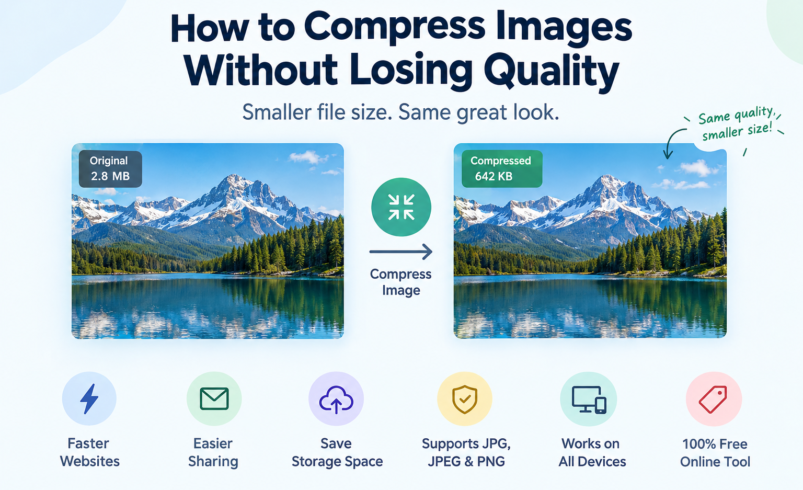

How to Compress Images Without Losing Quality Using an Image Compressor
Large image files can take longer to upload, share, store, and load on a website. Compressing them can reduce their file size while keeping the image looking clear and sharp. An image compressor makes this process simple by reducing unnecessary image data without requiring advanced editing skills or specialized software.
Whether you need to prepare photos for a website, reduce an attachment for email, meet an upload limit, or optimize pictures for faster web pages, image compression can make your files easier to manage. The key is finding the right balance between a smaller file and acceptable image quality.
What Is an Image Compressor?
An image compressor is a tool that reduces the file size of an image by removing or reorganizing data while preserving as much visual quality as possible.
Images can contain a large amount of information, including color data, metadata, and other details that are not always necessary for displaying the picture. Compression can reduce this data so the resulting file takes up less storage space and requires less bandwidth.
An online image compressor lets you perform this process directly in a web browser. You can upload an image, allow the tool to process it, and download the compressed version without installing desktop software.
The amount of reduction depends on factors such as the original format, dimensions, image content, compression method, and quality settings.
How Does Image Compression Work?
Image compression works by reducing the amount of data required to store an image. Different formats use different compression methods, so the results can vary considerably.
There are two broad approaches to image compression: lossy compression and lossless image compression.
Lossy Image Compression
Lossy compression reduces file size by removing some image information. The removed data may not be noticeable at moderate compression levels, allowing a picture to become significantly smaller while still looking good.
JPEG and many web-oriented image workflows commonly use lossy compression.
The main advantage is a substantial reduction in file size. The trade-off is that excessive compression can introduce visible artifacts, blurred details, blockness, or other quality problems.
Lossless Image Compression
Lossless compression reduces file size without permanently removing image information. When the image is decompressed, the original visual data can be restored.
This approach can be useful when preserving every detail is important, although the resulting file-size reduction may be smaller than with lossy compression.
PNG images are commonly associated with lossless compression, particularly when transparency and sharp graphical details need to be preserved.
How to Compress Images Online
Using an image compressor online is usually a straightforward process.
1. Choose Your Image
Select the photo, graphic, screenshot, or other picture you want to compress. Start with the original file whenever possible so the compression process has the best source material to work with.
2. Upload the Image
Upload your file to the online compression tool. Depending on the tool, you may be able to process common formats such as JPG, JPEG, and PNG.
3. Let the Compressor Process the File
The compressor analyzes the image and applies an appropriate compression method. The resulting file should have a smaller size while maintaining useful visual quality.
4. Download the Compressed Image
Once processing is complete, download the compressed version and compare it with the original if necessary.
For important images, check both the visual appearance and the final file size before using the compressed file.
Why Compress Images?
The main reason to compress an image is to make the file smaller without sacrificing more quality than necessary.
Reduce Image File Size
A large photograph can contain far more data than is needed for its intended use. Compression can reduce image file size, making the picture easier to upload, transfer, store, and share.
Improve Website Performance
Large images can contribute to slower page loading. Reducing image file sizes can decrease the amount of data a browser needs to download.
For website owners, image compression is therefore an important part of broader image optimization and performance work.
Make Uploads Easier
Some websites, applications, forms, and online services impose file-size limits. A compressed image may fit within those limits without requiring you to completely change the picture.
Save Storage Space
Smaller files consume less storage. This can be useful when managing large collections of photographs, product images, graphics, or other visual assets.
Make Sharing Faster
Compressed photos are generally easier to send through email, messaging services, cloud storage, and other platforms because smaller files require less data to transfer.
Image Compressor vs. Image Resizer
Image compression and image resizing are related but different processes.
Compression primarily reduces the amount of data stored in an image file.
Resizing changes the image’s physical dimensions, such as reducing a picture from 4000 × 3000 pixels to 2000 × 1500 pixels.
A large image can often benefit from both approaches. For example, a photograph intended for a small website thumbnail may not need its original dimensions. Reducing the dimensions first and then applying appropriate compression can produce a much smaller file.
However, resizing should not be used when the original dimensions are required for the intended purpose.
JPG, JPEG, and PNG Compression
Different image formats behave differently during compression.
Compress JPG and JPEG Images
JPG and JPEG are widely used for photographs and other images containing many colors and gradual transitions.
They are often suitable for:
- Photographs
- Blog images
- Product photos
- Social media pictures
- Website photography
- Email attachments
A photo compressor can significantly reduce the size of these files while maintaining good visual quality when an appropriate compression level is selected.
Compress PNG Images
PNG is commonly used for graphics that require transparency, sharp edges, or clean areas of solid color.
It can be particularly useful for:
- Logos
- Icons
- Screenshots
- Illustrations
- Interface graphics
- Images with transparency
A PNG compressor can reduce unnecessary data while retaining the characteristics that make PNG useful.
Because PNG and JPEG use different compression approaches, the ideal format depends on the image itself and how you plan to use it.
How to Compress Photos Without Losing Quality
The phrase “without losing quality” does not necessarily mean that every image must remain mathematically identical to the original.
For many everyday images, the practical goal is visually acceptable quality at a substantially smaller file size.
To achieve that balance:
Start With a High-Quality Original
Compression works best when you begin with a good source image. Repeatedly compressing an already compressed photo can make visible artifacts more noticeable.
Choose the Right Format
A photograph may work well as JPEG, while a transparent logo may be better suited to PNG. Choosing an appropriate format can have a major effect on the final file size.
Avoid Excessive Compression
A very aggressive compression setting can produce a tiny file but may also make the image visibly worse. The smallest possible file is not always the best result.
Consider Image Dimensions
If a picture is much larger than its intended display size, reducing its dimensions can substantially reduce the amount of data that needs to be stored.
Compare the Result
After using a picture compressor, inspect the compressed image at its intended display size. Look for blurry edges, unwanted artifacts, loss of fine detail, or changes in transparency.
Image Compression and Image Quality
Image quality and file size are closely connected.
Increasing compression can often produce a smaller file, but excessive compression may cause visible degradation. Reducing compression generally preserves more information but results in a larger file.
The ideal balance depends on how the image will be used.
A product photograph on an e-commerce page may need enough detail for customers to inspect the product. A small decorative image may tolerate more compression. A logo or screenshot may require sharp edges and therefore benefit from a different approach.
This is why effective photo compression is not simply about making every file as small as possible. It is about finding an appropriate balance between file size and visual quality.
What Types of Images Can You Compress?
An online image compressor can be useful for many different types of visual content, including:
- Photos
- Product images
- Blog images
- Website graphics
- Screenshots
- Social media images
- Digital illustrations
- Logos
- Email attachments
- Downloadable image files
The best compression approach depends on the format, dimensions, visual complexity, and intended use of the image.
Who Should Use an Online Image Compressor?
An online image compressor can be useful for almost anyone who regularly works with digital images.
Website Owners and Bloggers
Website publishers can compress images before uploading them to help control page weight and improve the overall efficiency of their pages.
E-commerce Sellers
Online stores often use many product photographs. Compressing those images can reduce file sizes while retaining enough detail for customers to view the products clearly.
Designers and Creators
Designers can use image compression when preparing graphics for websites, presentations, portfolios, or online platforms.
Students
Students may need to reduce photo or screenshot file sizes to meet assignment or portal upload requirements.
Social Media Users
A pic compressor can help reduce the size of images before uploading or sharing them through services with file-size restrictions.
Everyday Users
Anyone who has a large photo that is difficult to upload, send, or store can use compression to make the file more manageable.
Free Image Compressor vs. Paid Software
For simple image compression, you may not need advanced desktop software.
A free image compressor that works online can be convenient when you simply need to reduce the size of a picture quickly.
An online tool can be especially useful when you:
- Do not want to install software
- Need to compress an occasional photo
- Are working from different devices
- Want a quick browser-based workflow
- Need to reduce a file before uploading or sharing it
Professional image-editing software can provide more advanced control, but those features may be unnecessary for straightforward compression tasks.
Image Compression for Websites
Image optimization is an important part of preparing visual content for the web.
Large, unoptimized images can increase the amount of data a browser needs to download. Compressing images before publishing them can help reduce page weight.
However, image compression is only one part of website image optimization. Depending on the site and its requirements, you may also need to consider:
- Appropriate image dimensions
- Modern image formats
- Responsive images
- Descriptive file names
- Alt text
- Lazy loading
- Image delivery and caching
- The intended display size
Compression should therefore be viewed as one component of a broader optimization process rather than a complete website performance strategy.
Common Image Compression Mistakes
Compressing Every Image as Much as Possible
A smaller file is not automatically a better file. Excessive compression can make photos and graphics look noticeably worse.
Using the Same Format for Every Image
JPEG, PNG, and other formats have different strengths. Selecting a format based on the image’s characteristics can produce better results.
Ignoring Image Dimensions
Compressing a very large image does not necessarily make it appropriate for its intended display area. Dimensions matter too.
Repeatedly Compressing the Same File
Repeated lossy compression can progressively degrade image quality. Keep the original file and create compressed versions from it when possible.
Focusing Only on File Size
The best result is not necessarily the smallest possible file. A useful image should be small enough for its purpose while retaining the visual quality that users need.
Frequently Asked Questions
What is an image compressor?
An image compressor is a tool that reduces the file size of a picture by reducing or reorganizing its stored data. Depending on the compression method, it can reduce file size while preserving most or all of the image’s visual information.
How can I compress an image without losing quality?
Use an appropriate compression level, choose a suitable image format, and avoid unnecessary reductions in quality or dimensions. The goal is to find a balance between a smaller file and acceptable visual quality.
Can I compress photos online?
Yes. An online photo compressor lets you upload a picture through a browser, process it, and download a smaller version without installing dedicated image-editing software.
Can I compress PNG images?
Yes. PNG files can be compressed, particularly when they contain unnecessary data. PNG compression can be useful for graphics, screenshots, logos, and images requiring transparency.
Does compressing an image reduce its dimensions?
Not necessarily. Compression and resizing are separate processes. Compression reduces file data, while resizing changes the image’s pixel dimensions.
What is the difference between lossy and lossless compression?
Lossy compression removes some information to achieve greater file-size reduction, while lossless compression reduces file size without permanently removing the original image information.
Is a smaller image file always better?
No. A smaller file is useful when it still provides the quality and dimensions required for its intended purpose. Excessive compression can create visible quality problems.
Can I use compressed images on a website?
Yes. Compressed images are commonly used on websites to reduce file sizes and limit the amount of data visitors need to download. Compression should be combined with other appropriate image optimization practices.
Compress Images Online in a Few Steps
You do not need complicated software to reduce the size of an image. A browser-based image compressor can provide a simple way to prepare photos and graphics for websites, uploads, sharing, and storage.
Choose the image you want to optimize, upload it, allow the compression process to complete, and download the resulting file. Before using it, check that the final image still meets your quality and dimension requirements.
The right result is not simply the smallest possible file. Effective image compression gives you a practical balance between file size, image quality, compatibility, and intended use.