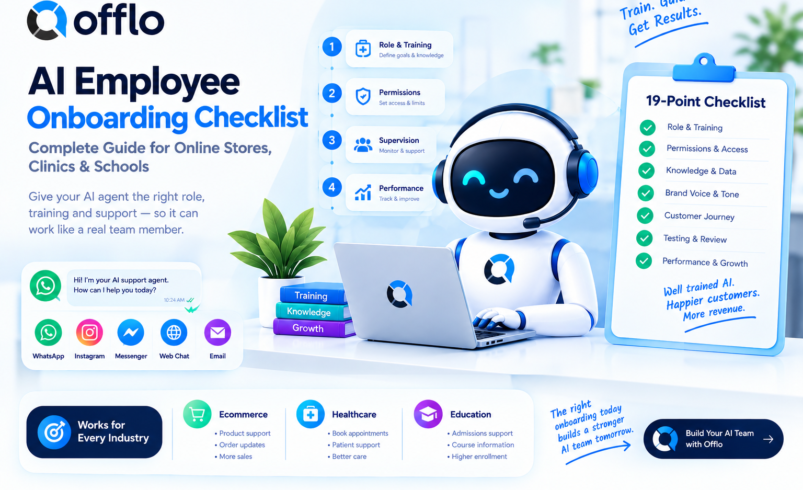

An AI employee onboarding checklist is a standardized list of 19 checks that every online store, clinic and school should complete before putting an AI agent to work on customer conversations. It treats the AI like a new hire, with a clear role, training material, permissions, supervision and a performance review, and it can be completed in-house or with an AI agent platform like Offlo.
If you are adding AI agents for business, the biggest barrier between you and good results is skipping the onboarding you would never skip for a person. An AI employee with no role, no training and no supervisor makes confident mistakes in front of customers. Pass the checklist and your AI support agent knows what to answer, what to ask and when to call a human.
This guide gives you the complete AI employee onboarding checklist, a plan for each industry, a breakdown of what to prepare, and every option for getting started, including how one AI agent can support the whole customer journey with offlo.ai.
What is an AI employee onboarding review?
An AI employee is an AI agent that handles real customer work, such as answering questions, qualifying leads, booking appointments and following up, inside the tools your team already uses. An AI employee onboarding review is the readiness check that confirms the agent has a defined role, approved knowledge, clear limits and a human supervisor before it goes live.
Online stores, clinics and schools run this review before launching a customer service AI agent, then repeat it whenever products, services, prices or policies change. The results are recorded on a simple onboarding plan signed off by whoever owns customer communication, and supported by the Offlo AI Agent and workflow automation.
Key facts about AI employee onboarding:
- Recommended before any AI agent for customer support talks to real customers
- Worth repeating whenever your catalogue, services, fees or policies change
- Covers 19 standardized checkpoint areas
- Can be completed in-house or with an AI agent platform like ai
- A good AI chatbot trained on your data answers from approved content and escalates everything else
The complete AI employee onboarding checklist
Whether you sell online, take clinic bookings or handle admissions, the core onboarding checklist is nearly identical. Here is every item your team should evaluate, grouped by category.
Role and training checks
| Checklist item | What to look for | Common fail reasons |
| Job description | One clear role, such as support, sales or booking | A vague “do everything” bot |
| Success goals | Targets such as faster replies, more bookings, fewer tickets | No way to judge performance |
| Approved knowledge | Products, services, fees and policies loaded and current | Outdated pages, missing FAQs |
| Trained on your data | Answers drawn from your own content, not guesses | Generic replies, invented facts |
| Brand voice | Tone and wording match your team | Robotic or off-brand messages |
| Customer journey map | AI knows the stages from first message to order or booking | Answers questions but never takes the next step |
| Common questions list | Top 20 questions tested before launch | Real questions never tried |
| Language coverage | Languages your customers use are supported | Replies in the wrong language |
| Knowledge owner | One person responsible for keeping content current | Nobody updates the AI |
| Training review | Wrong answers corrected and fed back | Same mistake repeated |
Permissions and supervision checks
| Checklist item | What to look for | Common fail reasons |
| Tool access | AI connects to the right systems through integrations | Too much or too little access |
| Action limits | Clear rules for discounts, refunds, bookings and fees | AI promising what only staff can approve |
| Escalation rules | Defined triggers for passing a chat to a person | AI keeps replying when it should stop |
| Human handoff | Full conversation passed to staff with context | Customer repeats everything |
| Supervisor | A named person reviews AI conversations | Nobody watching the AI |
Data and performance checks
| Checklist item | What to look for | Common fail reasons |
| Shared inbox | AI and humans work in one omnichannel inbox | Chats split across tools |
| Customer record | Every chat saved to one profile in the CRM | Lost history, duplicate contacts |
| Safety boundaries | No clinical, legal or unapproved fee answers | AI answering what it should not |
| Performance review | Resolution, handoff and conversion reviewed on a schedule | No view of whether the AI helps |
Pro tip: The single most common reason AI employees disappoint is no weekly review. Set a recurring slot to read a sample of AI conversations, fix wrong answers in your knowledge base and tighten escalation rules, just as you would coach a new teammate.
Online store AI employee plan: What you need
The online store AI employee plan is a one-page document your team fills out after running through the 19-point checklist above. Without it, there is no clear record of what the AI is responsible for, what it may do and who supervises it.
How to get the online store AI employee plan
You have three ways to build and complete your plan:
- Build it in a spreadsheet. Copy the 19 items above into a sheet and mark each pass or fail. This works well for small Shopify stores.
- Get it from an agency or consultant. Many ecommerce agencies design AI support roles during onboarding. Ask for the plan by name.
- Complete it with Offlo. The Offlo ecommerce platform gives you one AI agent for the whole customer journey, answering with your store already in view. It supports product discovery, cart recovery, order support and repeat purchase, with Shopify syncing products, orders and customers.
What the online store AI employee plan includes
A standard plan asks for:
- Store information: Store name, platform (such as Shopify), channels covered, key products
- Role definition: What the AI handles, such as support, sales or order tracking
- 19-point checklist: Pass or fail for each item above
- Limits note: What the AI must never promise or decide alone
- Supervisor and date: Who reviews the AI, and when the plan is reviewed again
Once your plan is complete, start with one channel, review conversations daily for the first week and expand from there. You can book a demo for a walkthrough or review pricing first.
Clinic and school AI employee plans: Requirements by industry
The clinic and school AI employee plans use the same 19-point checklist as the online store plan, but each has its own focus. Most of the setup carries over, so if you run more than one type of business you usually build the foundation only once.
How to get the clinic AI employee plan
Clinics, dental practices and wellness centres can complete the plan through:
- An internal review. The practice manager walks through the 19 checks and records the result.
- A compliance or operations lead. Many groups already have someone who approves patient-facing communication.
- Online with Offlo. The Offlo healthcare platform acts as an AI patient communication assistant. It gives instant replies, captures bookings, sends reminders and follow-ups, and routes enquiries to the right branch. It knows where its job ends: it does not diagnose, prescribe or store clinical records.
How to get the school AI employee plan
Schools, colleges, universities, academies and coaching centres can complete theirs through:
- An admissions team review. Counsellors define what the AI may answer and when to take over.
- A pilot with real enquiries. Run the AI on a small intake and review every conversation.
- Online with Offlo. The Offlo education platform works as an AI admissions assistant. It answers programme, fee, intake and deadline questions around the clock, qualifies each enquiry and hands the full conversation to a counsellor.
Can one AI employee serve every industry?
Yes, in most cases. The 19-point checklist is standardized, so your onboarding process, escalation rules, shared inbox and CRM can be reused across stores, clinics and schools. There are a few exceptions, though:
- Healthcare: The AI must not diagnose, prescribe or handle symptoms, medication or test results. Those go to your clinical team.
- Education: Fee, intake and deadline answers must match approved programme content, with counsellor handoff for complex cases.
- Ecommerce: Product, order and customer data must stay in sync with your store so answers stay accurate.
When in doubt, start with the shared checklist and add industry checks afterwards. The Offlo FAQ or the contact page can point you to the right setup.
Final thoughts
An AI employee works best when you onboard it like a person: give it a role, train it on approved knowledge, set its limits, supervise it and review its work. Do that and it can handle routine conversations while your team focuses on the ones that need a human.
If you want one AI agent for the whole customer journey, offlo.ai brings the AI agent, inbox, automation, CRM and marketing together. Explore the setups for ecommerce, healthcare and education, or book a demo to see it with your own channels.